Game Analysis: Great Gatsby for NES

Zeeblee

It has been a good long while since I’ve read The Great Gatsby, but I’m fairly sure that The Great Gatsby for NES does not truly reflect the novel in any way outside of its cutscenes and aesthetic.  It’s built just like any old platformer where it tells you the controls, but doesn’t tell you anything about the game world (though the controls are not displayed in-game).  It’s really short, so there isn’t all that much to actually comment on, but I found it enjoyable and worth a playthrough.  The lack of a pause button means it’s sort of an all-in adventure, but due to its short length that’s actually not that awful.

The one thing I will comment on is how I think it did a poor job of educating the player on how to fight the first boss.  Your attack (throwing a hat) operates as a sort of player-seeking boomerang.  The first boss is most easily defeated through the use of this mechanic by throwing the hat and then jumping up near the boss, but there is a problem:  the game doesn’t really present this to you as something important to practice until the boss fight.  Just about every enemy you encounter can be dealt with by just throwing the hat straight at them, which then also makes it bounce straight back to you.  The range on the default hat (there is a yellow hat power-up) is also extremely short, so there isn’t much opportunity to alter its trajectory.  On top of that the screen is actually rather thin, and since it tracks the player avatar (keeps it in the center) the short attack range of the default hat ends up being almost equal to your field of vision.  This makes it so you can’t really prepare for enemies by throwing out long shots, which also means that there isn’t much time to play with hat trajectory.  The issues of range/sight combined with how just throwing straight is all you need means the player likely won’t discover and develop the technique(s) required to manipulate the hat projectile in the first boss fight until that very boss fight.  Developing the skill required to defeat the boss is also rather unsatisfying as it never comes up again and the rest of the game can pretty much be played as before (throwing straight shots).

But I’m willing to look past this flaw because of just how classy the game is.  Or maybe it’s because I drank a martini every time I grabbed up a martini power-up…

Zeeblee

Mechanics Guiding Playstyle

gentleman-gustaf-figure

Earlier, I discussed how certain roleplaying systems exemplified certain gaming orientations. To an extent, this is a very peculiar notion. More specifically, it’s a very basic shorthand. After all, mechanics can never force your actions. But the way mechanics are set up can really impact the way the players think about the game.

Continue reading

Design Elements in Horror: SCP Containment Breach

gentleman-gustaf-figure

I’ve never particularly been a fan of horror games; they don’t weird me out, they don’t make me feel gross, and they don’t frighten me. Amnesia, Slenderman, FEAR, they’ve all struck me as sort of disappointing. They have occasional moments of “OH SHIT SOMETHING JUST HAPPENED!” followed by a lot of feeling in control. But I played one game recently which left me with a unique sense of both horror and dread I’ve never felt playing a game before. That game was SCP Containment Breach.

Warning: this whole post contains minor spoilers of the first 15 minutes (and the basic concept) of the game.

Here are some videos of me playing SCP: Containment Breach

Continue reading

Types of Games

gentleman-gustaf-figure

In my last post, I talked a lot about what roleplaying is, and – surprise! – it wasn’t just one thing! That is part of the beauty of roleplaying, it’s full of options. What are these options?

Well, first, we have the three qualities talked about before:

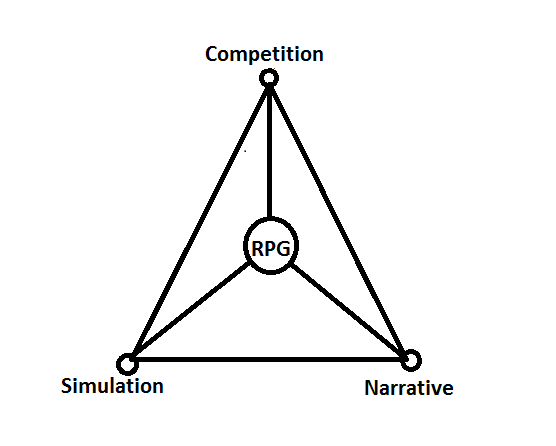
Roleplaying, Storytelling, Mechanics. To keep in line with the existing literature on Gaming Theory, I have slightly renamed the categories I used in the previous post. I have renamed ‘Mechanics’ as ‘Competition’ (it goes by ‘gaming’ in GNS Theory, but I find that to be a bit ambiguous of a term); it essentially refers to how much of the experience of the game is rooted in competition. Storytelling will be referred to as ‘Narrative’, and Roleplaying will be expanded slightly to ‘Simulation’. Simulation refers to how much of the setting goes to recreating system-internal realism. Note that this realism does NOT have to be actual realism. For example, many unrealistic things happen in Star Wars, but there is an assumed set of rules which governs things like lightsabers. Any given game will have a balance of the three, like so:

Game-Qualities

Continue reading

Controllers: Interfacing With Your Audience

Zeeblee

When discussing game mechanics we need to remember that there is more to gameplay than just the on-screen interactions.  There is a real-life interaction happening during every single game you play, and it occurs between you and the controller.  When designing a game you can’t just take this for granted, and it is actually an interaction which deserves a lot of thought.  How you want your player to interact with the game world can determine exactly what system your game should be released for as well as whether or not you will need an extensive controls tutorial to educate your players.

Before getting started on your game you should ask yourself, “What control systems do I have access to?”  This is an important question because each controller type places hard limits on potential player actions.  By this I mean that every controller has a different number of buttons which players can press (or nobs/joysticks to fiddle with, but we can pretend they are just a bunch of buttons), and that number of buttons acts as a ceiling value for how many actions you can offer to the player.  On one end of the spectrum we have the single-button, single-joystick Atari, with the Xbox 360 controller being somewhere in the current middle, and near the end the current rendition of the computer keyboard.  To be more specific:  A Nintendo controller has eight buttons (A, B, Select, Start, four directions on the D-Pad) while a computer keyboard can have around 84-102 buttons.  This means that if you were to assign a single action to a single button that the Nintendo can support eight individual actions where the computer can support at least 80 different individual actions.

Continue reading